
 GitHub |
  GitLab mirror | Preprint
Internal Data Structures
This page details the internal data structures and file formats used by the CABS simulation engine.
1. .cbs Files
A .cbs file is a compressed archive (tar/gzip) containing the complete set of input and output text files for the CABS simulation module.
Filename Pattern
yymmddHHMMSS<random string>.cbs (e.g., 180129155704Enar5w.cbs).
Extraction
To extract all files:
tar xzf myfile.cbs
This extracts INP, SEQ, TRAF, OUT, and FCHAINS. To extract a specific file (e.g., SEQ) to screen:
tar xzO SEQ < myfile.cbs
2. INP File (Input)
The INP file is a strictly formatted configuration file for the CABS engine. It contains simulation parameters and restraint definitions. No empty lines or comments are allowed.
Format
- Line 1: Random seed (integer).
- Line 2: MC parameters (
mc_annealing,mc_cycles,mc_steps,replicas,number_of_molecules). - Line 3: Temperature range and force field parameters (
T_start,T_end,FF_global_weight,Binding_weight,Replica_dTemp). - Line 4: Specific force field weights (6 floating-point values).
- Restraints Section:
- CA Restraints: Starts with a header (
Number of restraints,Weight_min,Weight_max), followed by $N$ lines of restraint definitions (Chain1, Res1, Chain2, Res2, Distance, Width, W_min, W_max). - SC (Side-Chain) Restraints: Follows the same format as CA restraints.
- CA Restraints: Starts with a header (
- Excluding Section: Starts with a header (
Number of pairs,Excluding distance), followed by pairs of residues to be excluded from certain interactions.
Example INP
1245
20 10 10 1 9
1.40 1.40 4.00 1.00 0.50
1.000 2.000 0.125 -2.000 0.375
1432 1.00
 1   2  1  48   6.58   1.00
 1   2  1  49   5.54   1.00
 ...
2 1.00
 1   5  2  12   4.50   0.50
 3  17  3  35   5.00   0.75
6 5.000
7 5 1 66
...
3. SEQ File (Input)
The SEQ file defines the primary sequence, secondary structure, and local flexibility of the protein. It uses a fixed-width format.
Format
Each line represents one residue: * Columns 1-5: Residue number (from PDB). * Column 6: Insertion code. * Column 8: Alternate location indicator. * Columns 9-11: Residue name (3-letter code). * Column 13: Chain ID. * Columns 14-16: Secondary Structure code (1: Coil, 2: Helix, 3: Turn, 4: Sheet). * Columns 17-22: Flexibility coefficient (0.0: fully flexible, 1.0: rigid).
Example SEQ
  135   GLU A  1  1.00
  136   ARG A  4  1.00
  ...
    1   MET J  1  1.00
    2   ALA J  4  1.00
4. FCHAINS File (Input)
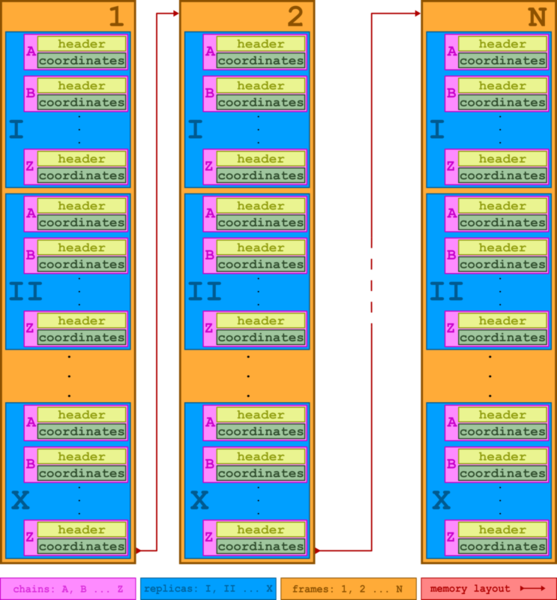
The FCHAINS file contains the starting coordinates for all atoms in CABS lattice units.
Key Characteristics
- Lattice Units: Coordinates are integers representing positions on the CABS grid (0.61 Å spacing).
- Dummy Residues: The CABS engine adds one "dummy" residue to the beginning and end of every chain to stabilize backbone calculations. Therefore, each chain in
FCHAINSis two residues longer than in the input PDB. - Organization: The file contains coordinates for every chain across all replicas.
5. TRAF File (Output)
The TRAF (TRAjectory File) is a text-based format containing the raw coarse-grained coordinates for the entire simulation. It is not a PDB file.
Structure
The file is organized into blocks. Each block corresponds to a single snapshot of the system and consists of:
- Header Line: A line containing technical metadata:
model_index,atom_count,energy_terms,temperature, andreplica_index. - Coordinate Blocks: The X, Y, and Z coordinates of the CA atoms, stored as integers in CABS lattice units.
Relationship to PDBs
The CABS-flex/dock Python wrapper automatically parses this file and converts the lattice coordinates into Angstroms (using a grid factor of 0.61). These are then saved as standard NMR-style multi-model PDB files (e.g., replica_1.pdb) in the output_pdbs/ directory.
6. EPAIRMOD File (Optional Input)
The EPAIRMOD file allows for residue-specific modification of pairwise interaction energies. This is used when the --pairmod flag is employed to strengthen or weaken specific contacts (e.g., for incorporating experimental data or modeling specific mutations).
7. OUT File (Output)
The OUT file contains a technical summary of the simulation run, including:
* Energy statistics for each replica.
* Acceptance rates for different types of Monte Carlo moves.
* Temperature distributions.
← Published Applications | ⬆ Back to top | Next: Contact and Updates